By RFID MFG Editorial Team · Updated October 7, 2026 · 6 min read
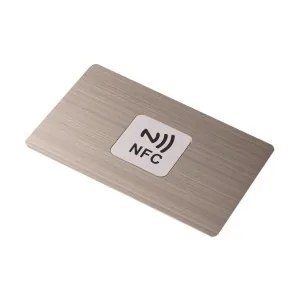
Choose an NFC card, label or tag for the application
A passive NFC product combines a chip and antenna with a card body, adhesive label or other enclosure. The reader or phone supplies power during a tap. For procurement, define the physical use and the digital action together: opening a profile, displaying instructions and working with an access reader have different acceptance requirements.
| Application | Starting format | Confirm before ordering |
|---|---|---|
| Team profiles or business cards | Printed NFC card | Material, names, shared or individual URLs, QR mapping and phone tests |
| Packaging, posters or product instructions | NFC label / sticker | Available area, mounting surface, adhesive, finish and encoded destination |
| Reusable token, wristband or access credential | NFC tag, fob or wristband | Reader / issuing system, chip support, physical wear and enrolment process |
For team rollouts, review custom NFC business cards. For packaging and display projects, review printed NFC labels and stickers. A label that works loose on a desk may behave differently on the finished package. Describe metal, nearby liquid, curvature and how the item will be handled so the proposed construction can be tested.
Phone-readable marketing tags are not automatically compatible with a door, hotel lock or payment system. If the project uses an existing reader, identify its model and supported credential before selecting a chip.
Plan the NFC record before choosing memory
Encoding writes the agreed record into the chip. Printing adds the visible artwork, name or QR code. Decide who performs each step, and whether every item shares a destination or carries a different link.
For a public landing page, begin with one short HTTPS URI record in NFC Data Exchange Format (NDEF). A link to a contact-download page is different from storing a vCard directly on the chip: the recipient still completes the contact-save flow, and direct vCard behaviour needs its own phone or app test.
| Chip | User memory | Selection check |
|---|---|---|
| NTAG213 | 144 bytes | Check the complete encoded record fits |
| NTAG215 | 504 bytes | Use when the tested record needs more space |
| NTAG216 | 888 bytes | Confirm the extra memory is needed by the application |
NXP specifies these user-memory capacities for NTAG213/215/216. NDEF formatting also uses space, so byte capacity is not a guaranteed number of URL characters. Have the encoder verify the actual record; more memory alone does not ensure phone compatibility. Use the NTAG chip comparison when discussing the proposed part number.
For variable data, agree the relationship between printed ID, QR content and NFC URL. Preserve leading zeros and record how duplicates, replacements and rejected items will be handled. The printed-card mapping example shows how to keep these fields separate without sending real employee or customer data.
Check the complete iPhone and Android tap experience
A compatible HTTPS tag can open a web destination without a dedicated tag-reading app, but the user may need to unlock the phone or tap a notification. Other record types and workflows can require an app. Do not promise identical behaviour across all phones.
Apple documents background tag reading on iPhone XS and later using a supported URI record, with a notification that the user selects. Android documents NDEF handling and device-state requirements; NFC must be available and enabled, and link handling depends on the system version and application. Include the intended models and operating systems in the sample review.
- Record phone model, OS version, NFC settings, screen state and normal case or accessories.
- Try the intended tap position on the finished card or mounted label, not only the loose inlay.
- Follow the notification, unlock and page-loading steps; then complete the intended action, such as saving a contact.
- Check the printed QR fallback independently and confirm it reaches the agreed destination.
Reading a tag and loading its web page are separate steps. The online page needs network connectivity. Test a printed short address or other fallback appropriate to the application, and decide what the user should see if the destination is unavailable.
Separate chip locking, website updates and authentication
A writable tag may be re-encoded within its supported limits. Permanent locking prevents later changes to the locked memory; approve the complete record and sample before authorizing it. A locked URL stays fixed, but the page or redirect behind that address can be changed if its owner retains control of the service.
For a team or campaign, name the owner of the domain, hosting, profiles and redirect account. Confirm ongoing fees, who can update or disable a destination and what happens if the provider changes. Card manufacturing does not by itself include a hosted profile service.
Read-only locking and a password do not, by themselves, prove that the attached product is genuine or stop someone copying a public link. NXP's NTAG 424 DNA family supports cryptographic authentication features; an authentication project also needs a designed verification service, key management and product-to-tag controls. Treat that as a separate system requirement, not a property automatically supplied by an ordinary NTAG213 URL label.
Approve a sample before specifying the bulk order
Use this sequence as a procurement checklist. Agree the pass criteria and inspection scope for your own application; this guide is not a record of completed product testing.
- Check the physical construction. Review size, print, finish, card material or adhesive on the actual mounting surface. Record the proposed chip and sample revision.
- Read back the encoded record. Compare it with the approved data. Where applicable, match the printed ID, QR and NFC destination row by row.
- Run the phone or reader workflow. Use the device checklist above and record the result, including any user actions needed.
- Verify update and write-protection choices. Test a page update or redirect under the agreed account. Apply irreversible locking only after approval, then confirm the sample remains readable.
- Record the release decision. Keep the approved artwork, record format, sample and test setup. Agree batch checks, packing order and how replacements will be reconciled.
A chip or construction change can alter the result. Ask whether another sample check is needed before accepting substitutions or changing the mounting surface.
Prepare an NFC quote or sample brief
Send the following information, leaving unknown items open for discussion:
- Application and intended action after the tap; card, label or other format.
- Quantity by design, size, material or mounting surface, artwork and finishing needs.
- Shared or individual links, example record format, QR/printed-ID mapping and who will encode.
- Target phones or reader system, write-protection choice and sample acceptance checks.
- Who maintains the online destination, delivery country and required arrival date.
Use a fictional record example for the initial discussion. Confirm price, minimum order, sample cost, included services and delivery timing in the written quote. A requested quantity or date is not an approved production commitment.
For sample planning, use the sample request on the selected product page and describe the test setup. The inquiry form accepts text; agree how to share artwork or a data file when the team replies.
Related reading
- NFC business cards for teams
- NFC printed labels and sample planning
- NTAG213 vs 215 vs 216 memory comparison
- RFID card artwork and data mapping
- RFID and NFC terminology
Frequently asked questions
Do NFC cards and tags need an app?
A supported NDEF HTTPS link can open through the phone's built-in NFC flow without a dedicated reader app. Unlocking or selecting a notification may be required. Other record types and applications need separate compatibility checks.
Can I change the link after the NFC tag is locked?
The URL in permanently locked memory cannot be rewritten. You can change the page content or redirect destination only while you control the associated website or service. Agree ownership and update access before encoding.
Does a larger NTAG chip make contact sharing work on every phone?
No. Choose memory based on the complete encoded record, then test the intended phone or application. A web link to a contact download and a vCard stored directly on the chip are different workflows.
Does locking an NFC label make a product counterfeit-proof?
No. Locking protects the locked memory from later writes; it is not proof of the attached product's authenticity. Authentication requires a suitable chip and verification design, including key management and product-to-tag controls.
What should I send for a bulk NFC order?
Describe the application, format, quantity by design, artwork, mounting surface, intended record, target devices and delivery needs. Mark unknown details and use fictional data examples. Confirm the final specification and commercial terms in writing.